
Are you tired of having your students watch movies or even worse, have a study hall when you have a substitute for your High School choral classes?
Why not use Sight Reading Factory to sharpen your students' sight singing skills during your absence?
If you have a way to project SRF onto a screen
Keep in mind that a substitute or a student leader can lead these exercises in your absence.
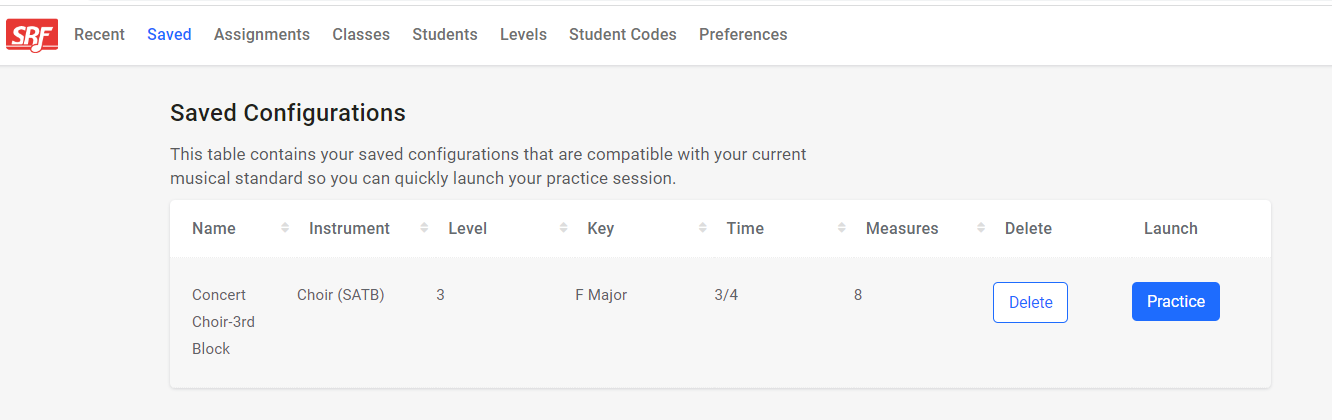
- Make a saved configuration with your preferred key, time signature, and/or number of measures to perform in class. Name your saved configurations something specific like "substitute - Women's chorale" or a specific date to make it easy to find. Saved configurations have an instant launch feature, which is super helpful for your substitute or student leader. Leave any more instructions such as perform in challenge mode with cursor, free play with metronome, etc. and remember to have them play their opening pitch(es). Check out this page to learn more about saving a SRF sight reading configuration.
- Have a sight reading competition - 3 ways!
- With a multipart exercise, mute individual parts and have those parts sing. (ie: Sopranos alone.) Rotate voice types and substitute teacher or student leader chooses the winner.
- Competition between multipart groups: SA versus TB for example. You can use unison ensemble music or multipart ensemble music depending on your particular needs.
- Knock out competition: Project a unison score. Have students stand. Play the opening pitch(es) and sing the exercise as an ensemble. If they miss a note, they sit. See who is left standing at the end of the exercise. You can then progress to a higher level, different key, or make your current level faster!
- Project a single line of music and immediately toggle off solfege/note names/scale degrees with the "a" shortcut on the keyboard. Have students write down on paper or in their devices the note names/solfege/scale degree. Toggle back on the solfege/note names/scale degrees with the "a" shortcut on the keyboard, and have students self assess how they did. To challenge students, this can be timed.
- Practice dictation! Give each student staff paper. Preload a single line exercise but do not project it! Have your substitute or student leader announce (or put on the board) clef, time signature, key signature, and the opening note with note value. Play the opening pitch, pause, and then play the exercise very slowly. Have students write the notes on their paper. Then project the exercise and have students self assess their work.
- Practice audiation! Have an exercise projected and play the opening pitch(es). ("O" as a keyboard shortcut.) Only sing the first note(s). Audiate the rest of the exercise and when you reach the end, sing the opening pitches and replay the opening pitch ("O" as a keyboard shortcut.) from the device to see if you match. You can do unison exercises or multipart exercises.
If your students have devices

- Use "Live Practice" to practice. Make a saved configuration (see above) specified to the needs of your class. Click on live practice to send individual parts to students' devices to practice as an ensemble. This is perfect to reinforce a concept with which you have been working. Make sure to play opening pitch(es) before singing together as a class. Check out this page to learn more about Live Practice.
- Practice dictation with live practice! Give each student staff paper. Preload a single line exercise but do not send to devices! Have your substitute or student leader announce (or put on board) clef, time signature, key signature, and the opening note with note value. Play the opening pitch, pause, and then play the exercise very slowly. Have students write the notes on their paper. Then send the exercise via "live practice" to their device and have students self assess their work.
- Give auto assessment assignments to your students! With our auto assessment feature, you can leave assignments for the class to do while you are away that will be graded automatically with the grades sent right to your dashboard! Although it does require a relatively quiet room, you can leave an assignment of varying difficulty and levels of grading strictness to your students that they can do while you are gone, and the grades come right back to you with the results of their playing. Check out our Auto Assessment blog here!
- Play knock out with rhythm only auto assessment! On your computer or each students' device, pull up a rhythm only assignment that can be auto graded using our auto-assessment feature! You can start off with lower levels, and work your way all the way up to the most difficult level until only one student is left! If you want to work on specific rhythms the class is having a difficult time with, you can even customize it so that those appear more often in each generation! This is super easy and fun, requiring no quiet spaces and a computer or tablet to use. Check out our rhythm only Auto Assessment blog here!
Written work
- Practice theory - 3 ways!
- Print out a single line exercise, enough for the entire class. (Or multiple exercises with clefs appropriate to the various voice types.) Also, print out answer keys that contain the note names or solfège. (Use the "a" shortcut on the keyboard.) Have students write in their note names or solfège and then your substitute or student leader can go over the correct answers and students can self assess. To challenge students, this can be timed.
- Print out a longer exercise and assign students to find certain musical concepts. Use colored pencils to designate the concepts. For instance, find all dotted rhythms and color them blue. Find all intervals of a third and color them red. Dynamics are yellow. And so forth. Bonus points if you have a color coded answer key available for the substitute or student leader.
- Print out a four part SATB choir exercise, enough for an entire class, and have students analyze the chordal structure. Have an answer key for the substitute or student leader to go over with the class so students can self assess.
- Compose! Print out a two part soprano and bass choral exercise, enough for the entire class. Also hand out staff paper. Have students write another melody to the bass line of the first exercise on the staff paper.
At some point during the school year, you will likely need to be away for personal responsibilities or professional development opportunities. By incorporating one or more of these ideas into your substitute plans, your students can continue strengthening the essential skill of sight reading even in your absence. Preparing these lessons ahead of time and empowering student leaders or substitute teachers to confidently facilitate Sight Reading Factory activities from the very beginning of the year can help keep your classroom productive, engaging, and musically focused no matter who is leading the class.
Need to order student accounts so you can use Live Practice with your ensembles? Visit our Pricing Page to learn more.
The SRF Team
Share this article